Guides
Review your coding agent's plan before it writes the code
Long Markdown plans in a terminal get skimmed and approved unread. Here is how linked canvases, live @agent comments, and zero-account pull request previews make reviewing an agent's plan fast — with a real example you can explore below.
If you build software with Claude Code, Google Antigravity, GitHub Copilot, or Codex every day, you already know this moment.
You ask your agent to plan a change that touches six files. Thirty seconds later, it prints four hundred lines of Markdown into a narrow terminal pane. You skim the headings, check two file names, hit approve, and twenty minutes later discover it wired the new route around the wrong auth check.
Long text walls hide structure. You cannot see how phases depend on each other without scrolling up and down, and fixing one piece means typing a paragraph back into chat and reading the whole plan over again.
I built Unpaged to fix how I review plans in my own daily work: put the phases on one overview canvas, and put each phase's tasks, risks, and diagrams one click inside it.
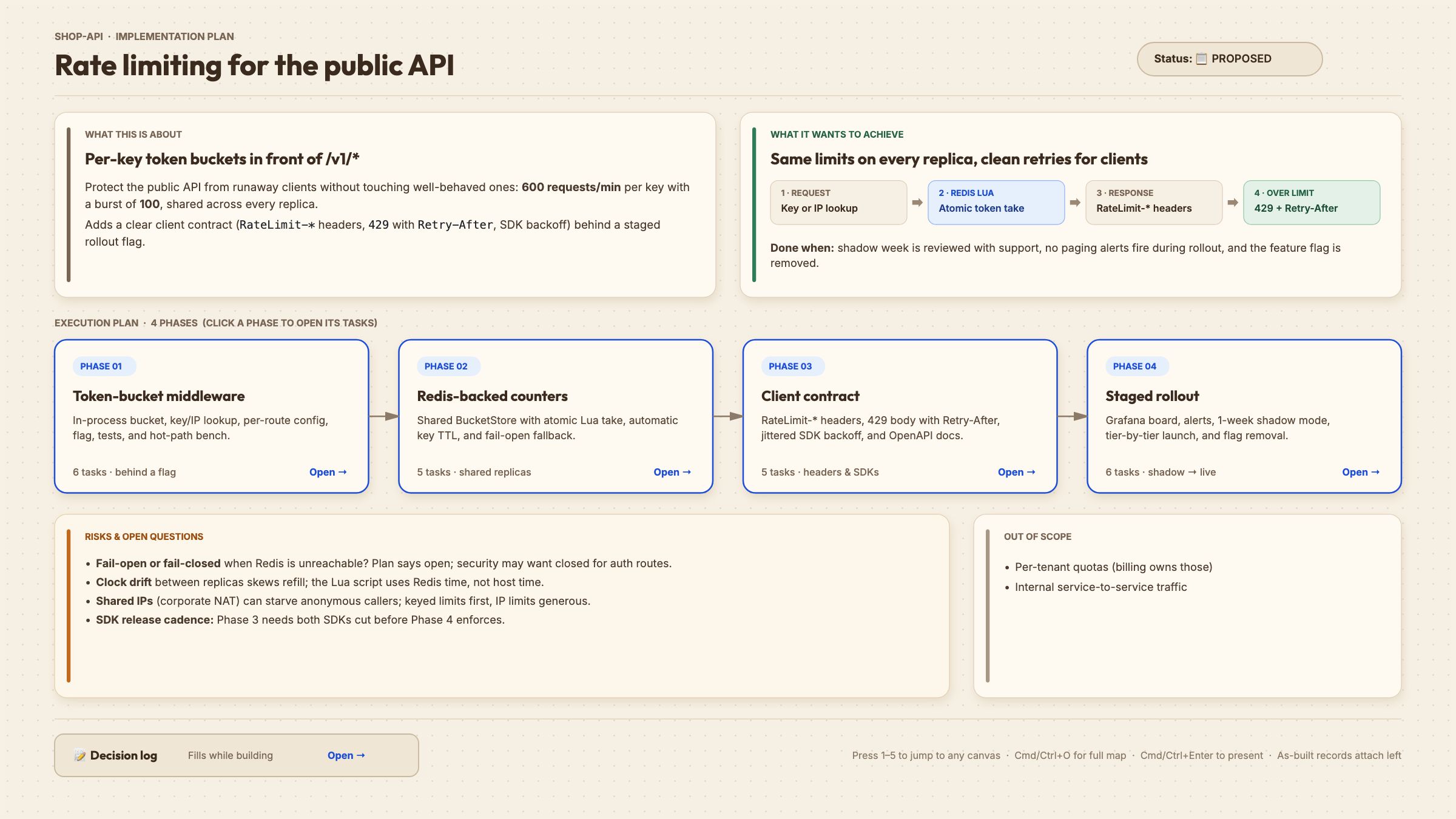
Here is a real visual plan my agent drew — try clicking any blue phase rectangle, or pressing 1–4 to jump into its tasks:
Comment @agent on the exact step you want changed
When something in the plan is wrong, you do not switch back to the terminal to argue with a text block.
Click the shape or task on the canvas, leave a comment mentioning @agent, and explain what should change — for example, splitting a migration in two or leaving an existing interface untouched. While your coding-agent session is running, it receives the comment automatically, updates that canvas in real time, and replies in the thread.
From approval to pull request — without losing the why
Once the plan makes sense, approving it flips the overview status from PROPOSED to EXECUTING. As your agent writes code, it appends a row to the plan's Decision log whenever it hits an unexpected constraint or departs from the original plan, recording what changed and why.
When the work finishes, running /unpaged:as-built adds a frozen as-built canvas under the plan listing what shipped versus what was planned.
And when your agent opens a GitHub pull request for that branch, the Unpaged plugin publishes the plan and places a clickable preview image and public link right in the pull request description. Teammates reviewing your PR can open the full plan and inspect every phase without creating an account — and anyone signed in can click Copy to my library to use it as a starting point. (You can turn the public link off anytime under Share → Public link.)
Keep your architecture map in step with the code
Even on tasks where you skip plan mode, codebase docs rot quickly. Running /unpaged:architecture reads your repository and draws an architecture canvas where every shape makes a concrete claim about how the system works.
Ask your agent to compare the canvas against recent changes — or click Compare in the Unpaged Architecture side panel in Google Antigravity — and it checks each claim against the code, flagging only what fell behind so you can update it before the map misleads the next developer.
Try it with your own coding agent
Unpaged plugins work with Claude Code, Google Antigravity, GitHub Copilot, and Codex (preview), and the remote MCP server connects directly to Cursor, VS Code, Claude, and ChatGPT:
- Claude Code: claude plugin marketplace add unpaged/plugins && claude plugin install unpaged@unpaged && claude mcp login plugin:unpaged:unpaged
- Google Antigravity: agy plugin install https://github.com/unpaged/plugins/tree/main/plugins/unpaged-antigravity
- GitHub Copilot: copilot plugin marketplace add unpaged/plugins && copilot plugin install unpaged@unpaged
- Codex (preview): codex plugin marketplace add unpaged/plugins && codex plugin add unpaged-codex@unpaged && codex mcp login unpaged
- Cursor, VS Code, Claude, ChatGPT: See one-click links and setup steps on the AI assistants page, or read the full review walkthrough on Visual plans.
You already pay for your coding agent, so Unpaged charges $0 AI markup:
- Free ($0 forever): Full editor, Markdown, Mermaid, UML, all plugins and MCP connections, up to 50 canvases per document, up to 5 collaborators per document, and 5 created documents in total (copies count; no credit card required).
- Premium ($10/month): Unlimited documents and canvases, pictures and GIFs on canvases, whole-document clickable PDF export, up to 50 collaborators per document, and priority support.
- Team ($15/seat/month): Everything in Premium plus Shared Space for your team on one monthly invoice.
- Company ($20/seat/month): Everything in Team plus self-serve SAML single sign-on, admin console, and company ownership of member canvases (starting from one seat).